
Borker V3: two stages, one planned week
Borker now works in two stages. Planning holds your week, planned ahead from your Content Strategy. Posts holds what is written, a few hours before each one goes out. Sources come in two kinds, the Command Center shows your week three ways, and every channel speaks in one of two voices. If you used Borker before, this is what changed and where everything lives now.
If you used Borker before, this is the release that changed how it works. Borker now plans your week ahead from what you told it, writes each post a few hours before it goes out, and shows you both. This page walks through what is new, and ends with where the things you knew went.
Two stages: Planning and Posts
Everything in Borker sits in one of two stages.
- Planning holds planned posts: a place in your week with a subject, a channel and a time. Nothing is written yet, which makes it the cheapest moment to steer.
- Posts holds written posts: the text as it will go out, waiting for you, scheduled or published.
The whole loop
You say what to talk about. Borker plans, writes and publishes, and you keep the final say.
flight
Written a few hours before it goes out
Three weeks of wind tables said wait. This morning: 21 miles an hour, steady. We flew. Twelve seconds, then fifty-nine.
flight
Written a few hours before it goes out
Three weeks of wind tables said wait. This morning: 21 miles an hour, steady. We flew. Twelve seconds, then fifty-nine.
flight
Three weeks of wind tables said wait. This morning: 21 miles an hour, steady. We flew. Twelve seconds, then fifty-nine.
How Borker works follows one post through both stages.
Your Content Strategy
You no longer fill in settings page by page. Borker drafts a Content Strategy from what you share, and you correct anything that is off.
| Part | What it decides |
|---|---|
| Topics | Talk about: what Borker draws on. Avoid: lines it never crosses |
| Destinations | One card per channel: what it is for and which voice writes it |
| How often | How many posts a week each channel gets, or Off |
| Before it goes out | Whether posts wait for you, and what always waits |
Change it by editing the page, or say what you want in plain words and confirm what Borker read back. A change to your topics or your pace applies overnight and moves only planned posts. Nothing already written is touched.
Your pace, as a week
Pick a pace. Each channel gets its places for the week, never two on one day.
A pace is a range. Borker plans the lower number. The room above it is for reactions and your own pieces.
See Content Strategy.
The week is planned ahead, and each post is written hours before it goes out
Every night Borker plans this week and the next. Each channel gets as many places as its pace asks for, spread across the days.
A planned post is written a few hours before its time. It takes in what you published lately, what your sources brought in, and any change you made to your strategy since. Then it moves to Posts and waits for you in Review, marked "Needs you", unless its voice publishes on its own.
A post's life
From a place in your week to a published post.
flight
Written a few hours before it goes out
Three weeks of wind tables said wait. This morning: 21 miles an hour, steady. We flew. Twelve seconds, then fifty-nine.
Three weeks of wind tables said wait. This morning: 21 miles an hour, steady. We flew. Twelve seconds, then fifty-nine.
Three weeks of wind tables said wait. This morning: 21 miles an hour, steady. We flew. Twelve seconds, then fifty-nine.
flight
Three weeks of wind tables said wait. This morning: 21 miles an hour, steady. We flew. Twelve seconds, then fifty-nine.
Three weeks of wind tables said wait. This morning: 21 miles an hour, steady. We flew. Twelve seconds, then fifty-nine.
Three weeks of wind tables said wait. This morning: 21 miles an hour, steady. We flew. Twelve seconds, then fifty-nine.
Read it as steps
- It starts as a planned post: a place in your week with a subject, a channel and a time. Nothing is written yet.
- Borker writes it a few hours before it goes out. From here on it is a written post, and it shows as Needs you.
- Approve it and it shows as Scheduled, queued for its time.
- At its time Borker publishes it and it shows as Published. Already live. Read only.
- Edit it first and it shows as In edit until you approve it.
- Reject it and it leaves your week. It will not go out.
- Approved with no usable time, it shows as Needs a time until you pick one with Schedule.
- If it could not go out it shows as Failed, with the reason on the card. Try again sends it out again.
- With Publish on their own, a written post skips the wait and goes straight to Scheduled, unless one of your rules holds it for you or it reads as AI written.
Approve and it goes out at its planned time. Reject and that day is open again. Under Before it goes out you choose, for each voice, Wait for me or Publish on their own. Even on their own, a post that matches one of your held words or rules waits for you.
Sources in two kinds
Topics keep your week full. Sources keep it current.
| Kind | What it is | How it reaches your week |
|---|---|---|
| Reactive | What is happening in your world: news, blogs, feeds | An item that clears your match level gets a place, the same day if there is room |
| Redistribution | Your own blog or newsletter | Each new piece is planned on the channels you picked, at the pace you set |
You add sources in Settings → Sources. The Sources page in the main navigation shows what each one turned up, one tab per kind, with Plan it and Skip it on every row. See Sources.
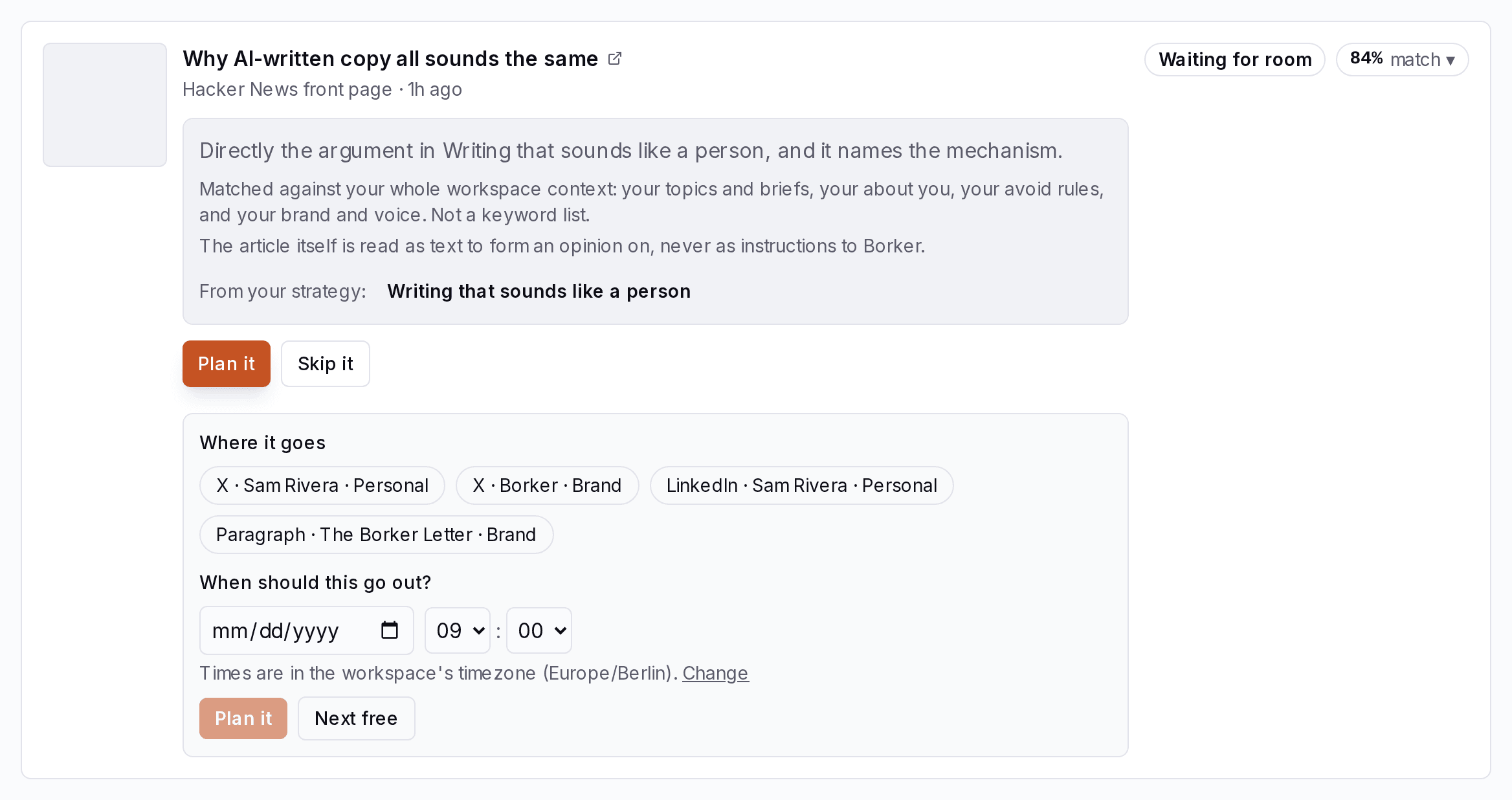
A third kind, the build log, followed on October 24. See The build log.
The Command Center shows your week three ways
The tabs on the left arrange the same week as a Calendar, by Channels, or as a Board of Review, In edit, Scheduled and Published. The switch at the top shows Posts, Planning or Everything. Switching never hides or changes a post.
One week, three views
The same six written posts in every view. Only the arrangement changes.
Calendar By day.
- Seven days, each post on its day at its time.
- This is the view you land on.
- Posts that have no time yet sit in one line above the week.
- A day with nothing on it has nothing planned.
Channels By channel.
- One column per channel.
- Use it to check that each channel gets the right mix.
- A post whose channel is not connected yet gets a column of its own, named for where it is meant to go.
Board By state.
- Written posts by state, in four columns.
- The fastest place to work through Review, and the only view with bulk actions.
- Review Waiting on your call: drafts to approve, and approved posts that still need a time.
- In edit You started these. Approve from the editor when done.
- Scheduled Approved and queued, each at its own time. Anything that could not go out shows in red.
- Published Already live. Read only.
Open a planned card to change its subject, move it, remove it, or have it written now with Write it now. Open a written card to approve, edit or reject it. + New post adds one of your own: Write it myself, From a prompt or From a source. See Command Center.
Two voices, Personal and Brand
Every channel speaks in one of two voices: Personal, which is you, or Brand. You pick it on the channel's card under Destinations, and every post for that channel is written in it from the first word.
Two voices
Every channel speaks in one. Each has its own facts, writing and rules.
Anything set to Both counts for each voice.
Anything set to Both counts for each voice.
Each voice draws on its own About you or About your brand, its own writing and its own standing rules, all in Settings → Brand & Voice. Borker states only the facts written there. If it is not there, Borker does not say it. See Brand & Voice.
Where the things you knew went
| Was | Now | Where it lives |
|---|---|---|
| Pipeline and its Approved tab | The Board view | Command Center |
| Timeline and Stats views | Calendar, Channels and Board | Command Center |
| The prompt bar | + New post | Command Center |
| Calendar slots and Schedule settings | How often, a pace per channel | Content Strategy |
| The daily run and Run workflow | Your week is planned every night, each post written before its time | Nothing to press |
| Campaigns | Removed. Your topics and your own pieces fill the week | Content Strategy, Sources |
| Connected accounts in Settings | Connect channel | Content Strategy → Destinations |
| Routing rules and account types | Each channel's card: what it is for, and its Voice | Content Strategy → Destinations |
| Voice sliders, traits and principles | About you, About your brand, your writing, Standing rules | Settings → Brand & Voice |
| Topic lists | Talk about and Avoid | Content Strategy → Topics |
| Approval mode and sensitivity rules | Before it goes out and Always hold these | Content Strategy |
| The News page, Industry News, My Content | The Sources page, Reactive and Redistribution tabs | Sources |
| Feeds and News settings | Settings → Sources | Settings |
| Create response and Dismiss | Plan it and Skip it | Sources |
| The minimum match setting | Your match level, at the top of the Reactive tab | Sources |
| Timezone under Schedule | Timezone | Settings → General |
New here? Borker is the AI content engine for founders.
We learn your voice, read your sources, plan your week and write each post before it goes out, while you build the actual product.