
Auto-publish, sensitivity rules, and a routing rebuild
Borker can now ship generations directly to your channels, with keyword and AI-judged sensitivity rules holding the risky ones for review. The routing layer was rebuilt so multi-channel workspaces stop guessing where content goes. LinkedIn posts attach images. The schedule settings you've been configuring for months are now honored.
This release is the biggest shape-change Borker has had since onboarding was redesigned. The headline: you can now turn on auto-publish with fine-grained safety rails, instead of the old all-or-nothing review flow. Underneath that, content delivery has been rebuilt around real routing rules so multi-channel workspaces stop guessing which post goes where. A stack of small bugs that have nagged for weeks (images not attaching, schedule settings being ignored, manual sync clicks to find out what published) are gone too.
Auto-publish and sensitivity rules
The Schedule settings page used to offer three approval modes (Auto-publish, Review sensitive, Always review). The middle one was a no-op. We've collapsed the picker to two modes (Auto-publish and Always review) and added a separate Sensitivity Rules section that works as a universal escape hatch across both.
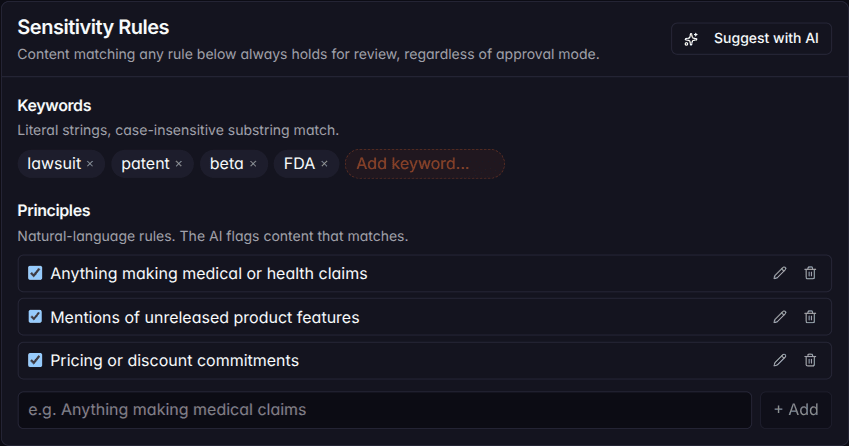
Two kinds of rules:
- Keywords: literal strings, case-insensitive substring match. Add
things like
lawsuit,FDA,beta, competitor names, ex-employees. These match in zero milliseconds and cost nothing. - Principles: natural-language rules. "Anything making medical claims." "Mentions of unreleased product features." "Pricing or discount commitments." A small AI model checks each generation against your enabled list.
Whichever mode you're in, content matching any sensitivity rule always holds for review. Even on Auto-publish, a draft that mentions a keyword you've added will land in your Pipeline with a Sensitive pill listing the rule that matched, so you see at a glance why something held.
There's a "Suggest with AI" button on the Sensitivity Rules card that proposes keywords and principles based on the brand context you've already configured in Settings → Brand & Voice. Most workspaces get a sensible starter set in under a minute.
Setting it up takes about 30 seconds:
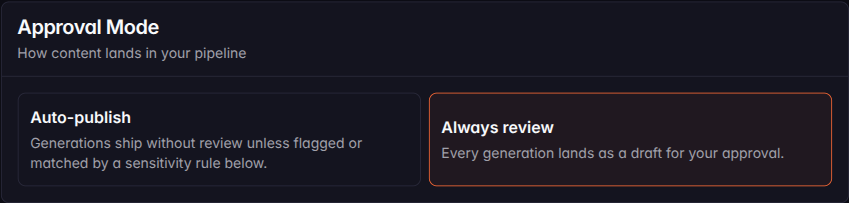
If you'd rather keep the prior behavior, Always review preserves it. Every generation still lands as a draft for your approval. Nothing forces you to flip on auto-publish.
Smart channel routing
If you've ever connected three channels and watched Borker quietly favor one of them with no way to tell why, this fixes that. Content delivery has been rebuilt around explicit, configurable rules in Settings → Routing.
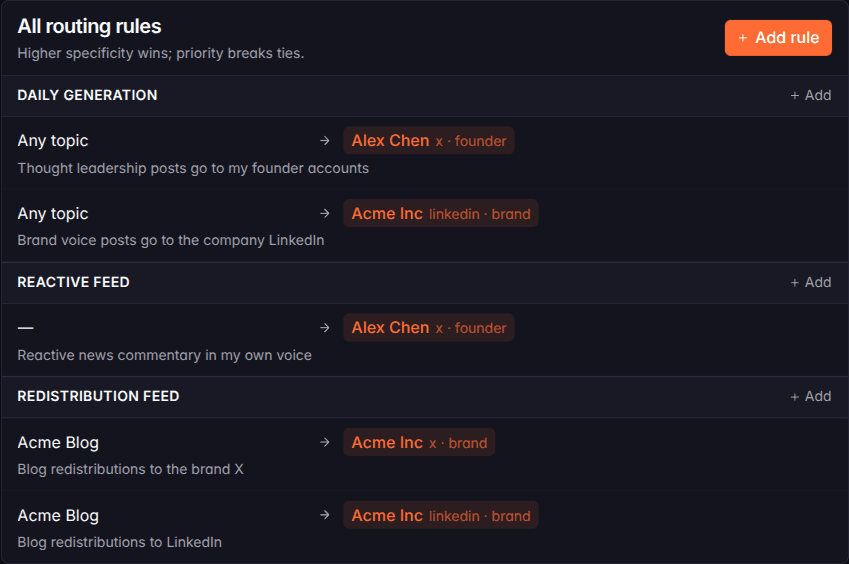
You can now express things like:
- "Thought leadership posts go to my founder accounts."
- "Brand voice posts go to the company LinkedIn."
- "Reactive news commentary goes to my X founder account."
- "Blog redistributions fan out to the brand X and the company LinkedIn."
Every automated path (daily generations, news-reactive posts, redistributed blog posts, campaign content) now resolves through your rules. If you don't have a rule covering a path, the workflow skips it and surfaces a coverage banner on your Dashboard and Pipeline so you can fix the gap. No more silent guessing.
A handful of intent presets at the top of the routing page let you spin up the most common rules in one click: Founder voice, Brand voice, Reactive on X, Blog redistribution. Pick one, choose the target channels, done.
Schedule settings that work
Four schedule controls have been in the UI for as long as Borker has shipped. Until this release, none of them were enforced by the scheduler.
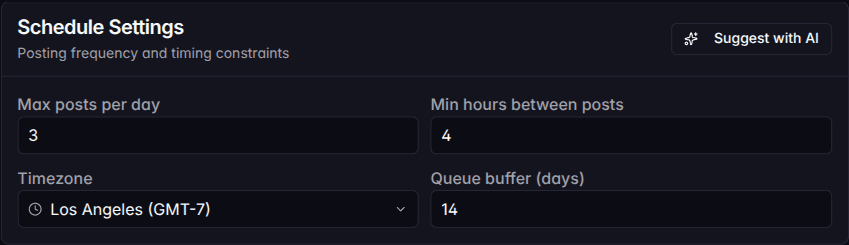
- Min hours between posts: every new slot now sits at least N hours away from any existing scheduled post in your workspace.
- Max posts per day: full days get skipped to the next day with capacity, so you don't wake up to 5 posts piled up on Tuesday.
- Queue buffer days: the scheduler stays within this lookahead window when picking slots; only past it as a last resort.
- Max reactive posts per day: the news-reactive cap is now what you set, not a hardcoded 2.
All of this is timezone-aware. If your workspace timezone is
America/Los_Angeles, slots get computed in Pacific time. Workspaces
in non-UTC zones were getting slots assigned in the wrong day before
this release.
Images on LinkedIn attach
If you've ever uploaded a hero image to a draft, scheduled it, and watched the post publish without the image, that bug is gone.
Media now uploads to the publishing backend correctly before each scheduled post goes out. The upload is cached on the content item so rescheduling the same post doesn't re-upload.
Custom CTAs on LinkedIn redistributions
Auto-redistributing your blog to LinkedIn used to leave the call-to-action up to the model. Every post invented a different one: "Read more →." "What do you think?" "Tag someone who needs this." Output quality was unsteered.
You can now set the CTA explicitly: a freeform text field plus an
optional URL. Type Try Acme free for 14 days with
https://acme.example/start, and every redistribute post lands with
that exact CTA on its closing line. Empty values fall back to the
model-decides behavior if you prefer that.
Same release, Auto-generate reshare took a multiselect of destination channels. If you have multiple founder accounts, all of them get reshares now.
Status auto-syncs from your channels
When a scheduled post publishes on the publishing backend, the Pipeline updates automatically. The item moves from Scheduled to Published without you clicking anything.
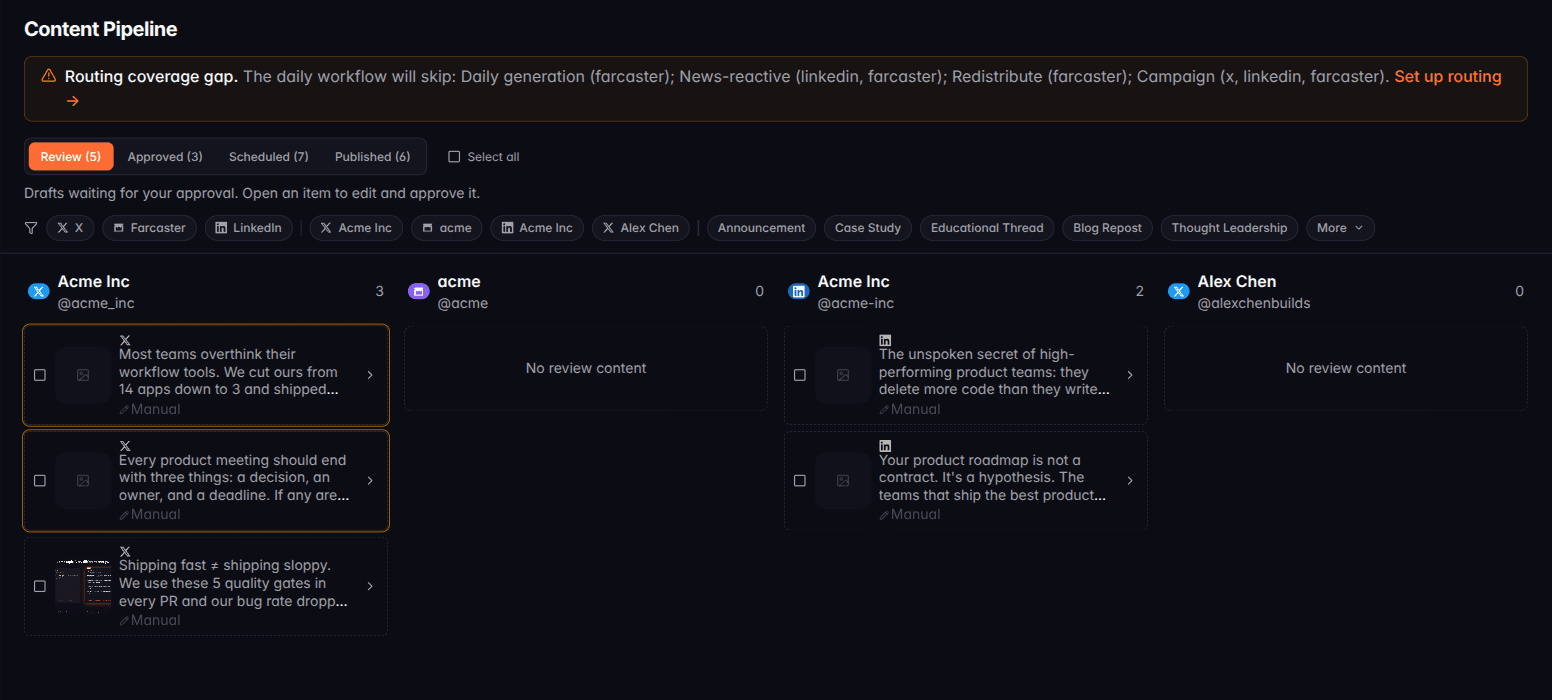
Two paths cover this. A background sync runs hourly for workspaces with posts pending past their scheduled time (skipping empty workspaces). Opening the Pipeline page also triggers an immediate sync if it's been more than 30 minutes since the last one. Either way, your Published tab fills in on its own.
Bug fixes
- Onboarding hang on plan-limit modal. Some users got stuck on a re-render loop when the plan-limit modal tried to read the latest plan state during a stale session. Fixed.
- Hourly background errors. A scheduled background job was hitting a timeout exactly at the top of every hour. It now completes in time.
- Routing rule editor polish. The platform and account-type dropdowns now narrow to options present on your workspace, and the labels are clearer about what each filter does.
New here? Borker is the AI content engine for founders.
We learn your voice, watch your news feeds, and ship posts to X, LinkedIn, Farcaster and your blog while you build the actual product.