
Sources
Point Borker at the feeds you care about, your own published work and your build log, and it turns what they bring in into posts for your week.
Topics keep your week full. Sources keep it current. A source is something Borker reads for you, regularly, and each new item it finds can become a post. There are three kinds, and each one reaches your week in its own way.
How a source reaches your week
Three kinds of source, each with its own way in.
The wind table
Written a few hours before it goes out
The tunnel notebook
Written a few hours before it goes out
852 feet in 59 seconds
Written a few hours before it goes out
The wind table
Written a few hours before it goes out
The tunnel notebook
Written a few hours before it goes out
852 feet in 59 seconds
Written a few hours before it goes out
Read it as steps
- Reactive. Things happening in your world. Borker reads each new item against your strategy and gives it a match with a short reason.
- A match at or above your level gets a place in your week, often the same day. One under it shows as Below your level, and Plan it anyway still gives it a place.
- Redistribution. Your own published work. Your own pieces get no match: each new one shows as Not yet shared.
- With New pieces: Borker paces them, each piece gets one post per channel, at the pace you choose. With I plan them, it waits until you press Plan it.
- Build log. What you are working on, in the order it happened. Your agent sends each entry, and it shows as Not yet planned.
- With New entries: Borker paces them, each entry gets a place on the channels picked for it. With I plan them, it waits until you press Plan it.
- Each one arrives in Planning as a planned post: a place in your week. Nothing is written yet.
| Kind | What it is |
|---|---|
| Reactive | Things happening in your world: news, blogs, feeds |
| Redistribution | Your own published work: your blog, your newsletter |
| Build log | What you are working on, sent by your coding agent |
You set sources up in Settings → Sources. You see what they turned up on the Sources page in the main navigation, one tab per kind.
Add a source
Press Add source. Borker checks the address before it adds it, and starts reading within the hour.
An address Borker cannot read is refused under the field, with the reason. Only workspace admins and owners add, change or remove sources. A build log is not added here: it appears once your agent sends its first entry. See Build log.
What Borker watches
Every source, with its name, address and kind. A source Borker suggested while setting up your strategy carries Picked for you and is read like any other.
| On a row | What it does |
|---|---|
| Check now | On a Redistribution feed, reads it right away instead of waiting for the next read. Once a minute at most. |
| Edit | Changes the name, the address or the kind. On a Redistribution feed, also its pace and channels. |
| Remove | Borker stops reading it and forgets what it turned up. |
A feed that will not read says why on its row, for example "Could not read this feed: it did not answer in time". The line goes away after the next good read.
From a source item to a post
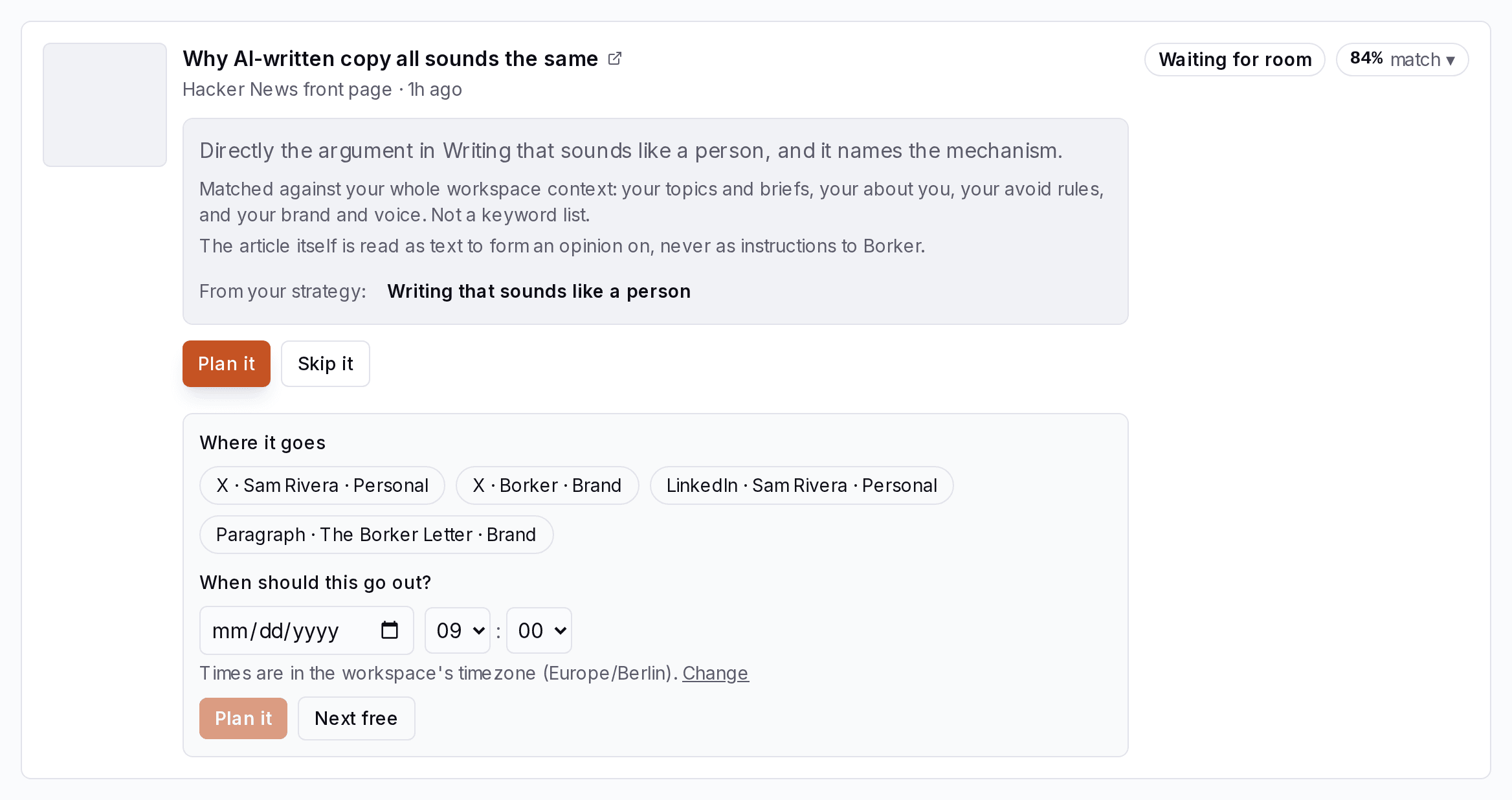
Every item follows the same two stages as the rest of Borker. First it becomes a planned post in Planning: a place in your week, nothing written yet. A few hours before that time, Borker writes it, and it arrives in Posts as a draft in Review, waiting for you unless its voice publishes on its own.
Each kind decides on its own which items get a place. Every kind shares the same buttons on the Sources page for planning one yourself:
| Button | What happens |
|---|---|
| Plan it | Asks "When should this go out?" Pick a day and time, or press Next free, and tick where it goes. |
| Skip it | Sets the item aside. It stays on the list with its reason. |
| Plan it anyway | Plans an item that was set aside. |
| Replan for… | Adds an item that is already planned to more channels. |
A planned row shows when and where it goes, with a link to it in the Command Center. Check now at the top of the Reactive and Redistribution tabs reads every source of that kind at once. Only admins plan and skip.

Links in posts
A post written from a source carries a link back to it: a reaction links to the article, a post from your own piece links to the piece. Borker adds the link when the post goes out, where each channel puts links. Posts from your build log carry no link.
| Channel | Where the link goes |
|---|---|
| X | The last post of the thread. A single post becomes a two-post thread. |
| LinkedIn profile and page | On its own line at the end of the post |
| Bluesky | A link card, or at the end of the text when the post has a picture |
| Farcaster | The cast's embed |
| Paragraph | In the body, after the first paragraph |
Where the link goes
Posts link to the piece they came from. Each channel has its own place for the link.
Borker adds the link when the post goes out
Personal
Goes out as the last post of the thread.
1/2Three weeks of wind tables said wait.
2/2weather.example
PersonalBrand
Goes on its own line at the end of the post.
Three weeks of wind tables said wait.
weather.example
Personal
Goes out as a link card, or at the end of the text when the post has a picture.
Three weeks of wind tables said wait.
The wind tableweather.example
Brand
Goes out as the cast's embed.
Three weeks of wind tables said wait.
The wind tableweather.example
Brand
Goes in the body after the first paragraph.
Three weeks of wind tables said wait.
Read the original: weather.example
Two switches on the Links in posts card turn links on or off for a whole kind. Both start on.
- Reactive links: posts that react to an article
- Redistribution links: posts made from your own pieces
To change the link on one post, open it, press Edit and use the Link field: replace the address, Remove it, or press Use the piece's link to go back to the original.
On X, a post that carries a link spends one X URL credit. With none left, Borker offers to add a pack or to send the post without its link. See Billing.
Sent by your agent
Sources an agent sends to, like your build log, appear on this card in Settings → Sources once the first entry arrives. Each has its own tab on the Sources page and a switch for whether Borker paces new entries into your week or holds them for you.