
Command Center
Your week on one page. See what is planned, read what is written, and decide what goes out.
The Command Center is where you see your week and act on it. It shows one week at a time, in two stages:
- Planning: planned posts. Each one has a place in your week, a subject and a channel. Nothing is written yet.
- Posts: written posts. You review them, approve them, and they go out at their time.
Borker writes a planned post a few hours before it is due. From then on it is a written post, waiting for you in Review unless you let that voice publish on its own.
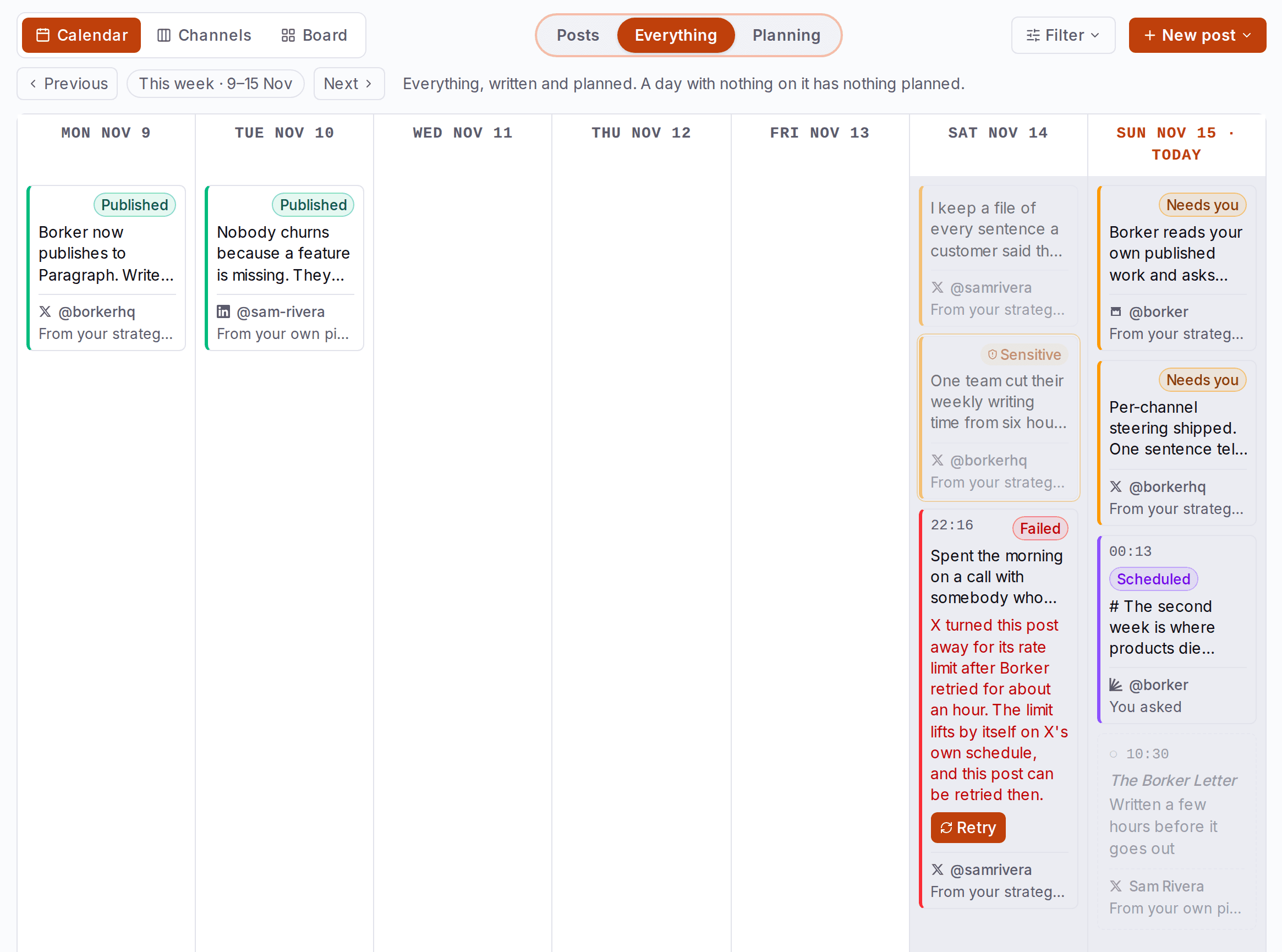

Planning, Posts or Everything
The switch in the middle of the top row picks which stage you are working on. It works in every view.
| Mode | What you see | Use it to |
|---|---|---|
| Posts | Only written posts. Planned ones stay hidden until they are written. | Review and approve |
| Everything | Written and planned together. This is the default. | See the whole week |
| Planning | Planned posts and anything that still needs your call. Everything already in motion is faded. | Check what is coming and change it in time |
For the whole path of a post, from a place in your week to published, see How Borker works.
Three views of the same week
The tabs on the left arrange the same posts three ways. Switching a view never hides or changes a post. Pick a view below to see the same week in it.
One week, three views
The same six written posts in every view. Only the arrangement changes.
Calendar By day.
- Seven days, each post on its day at its time.
- This is the view you land on.
- Posts that have no time yet sit in one line above the week.
- A day with nothing on it has nothing planned.
Channels By channel.
- One column per channel.
- Use it to check that each channel gets the right mix.
- A post whose channel is not connected yet gets a column of its own, named for where it is meant to go.
Board By state.
- Written posts by state, in four columns.
- The fastest place to work through Review, and the only view with bulk actions.
- Review Waiting on your call: drafts to approve, and approved posts that still need a time.
- In edit You started these. Approve from the editor when done.
- Scheduled Approved and queued, each at its own time. Anything that could not go out shows in red.
- Published Already live. Read only.
Use the arrows beside the week's name to move a week back or forward, and Today to come back. Filter narrows the week by platform, channel, source, date range or properties such as media.
Reading a card
Every card is either a planned post or a written post, and they never look alike.
Reading a card
Two kinds of card: a place in your week, and a written post.
flight
Written a few hours before it goes out
- 1Planned, in gray. There is no post yet, and gray is no state.
- 2Its time. The open circle says nothing is written yet.
- 3Its subject, from your strategy or from one of your sources.
- 4When Borker writes it.
- 5Its channel, and where the post will come from.

Three weeks of wind tables said wait. This morning: 21 miles an hour, steady. We flew. Twelve seconds, then fifty-nine.
- 1Its state, in one color on the left edge and on the chip.
- 2When it goes out.
- 3Sensitive, AI-ism or Flagged: a marker when it needs a closer look. The card wears a ring in the same color.
- 4Its picture, when it has one.
- 5The post as written. Words one of your rules caught are tinted.
- 6The channel it goes out on.
- 7Where it came from. Select it to see every post from the same place.
- Needs youWaiting for your review.
- In editYou are editing it.
- Needs a timeApproved, with no usable time.
- ScheduledQueued for its time.
- PublishedAlready live. Read only.
- FailedIt could not go out.
Each card also names where the post came from. Select that label to see every post from the same place.
Where a post comes from
Every card names one of these six.
- From your strategyA topic from your Content Strategy.
- Reacting toSomething one of your sources published.
- From your own pieceYour own writing, shared again.
- From your build logAn entry your agent sent.
- You askedA post you wrote or asked for.
- Via agentA draft your agent made.
Change a planned post
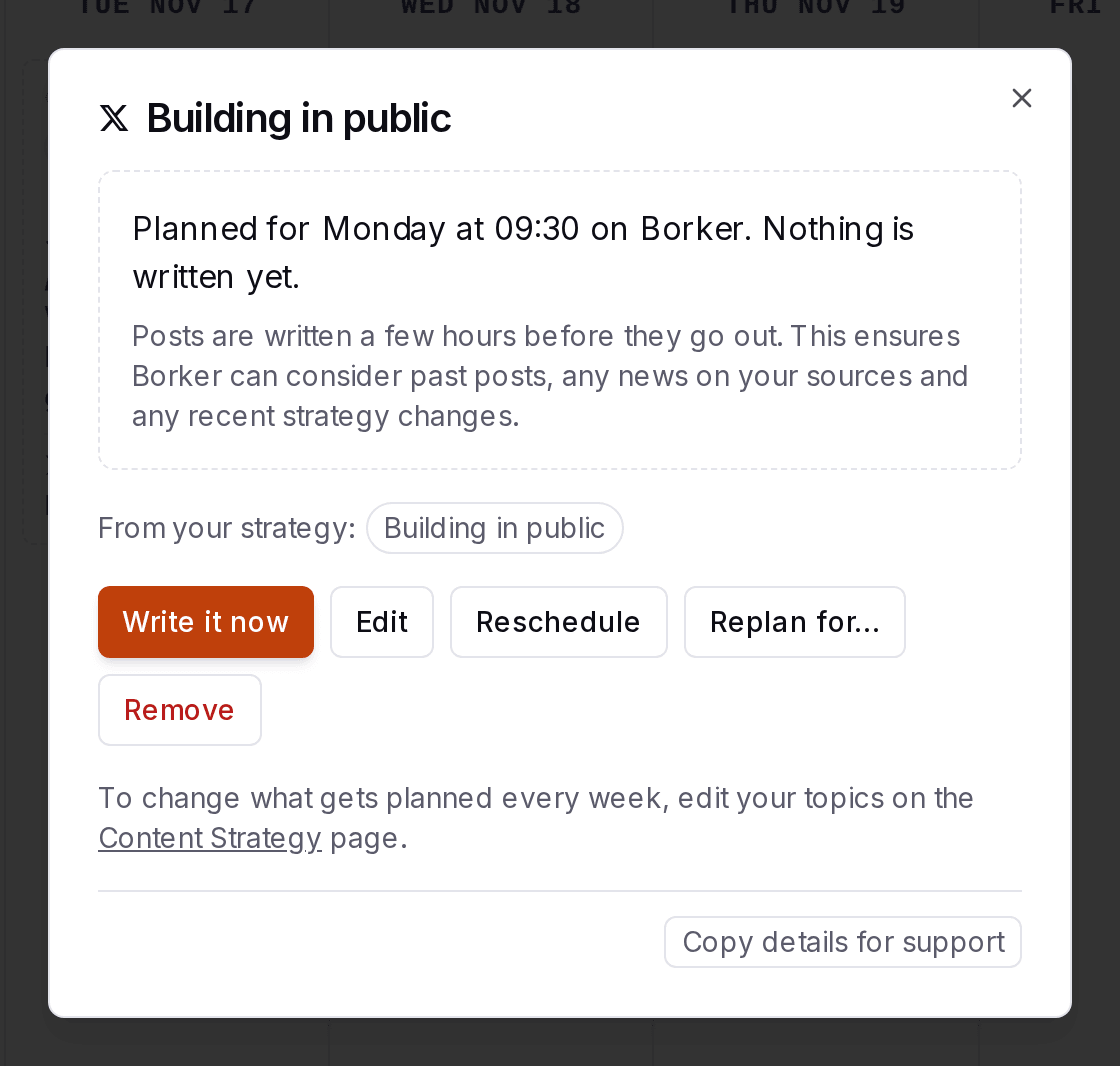
Select a planned card to open it. Nothing is written yet, which makes this the cheapest moment to steer.
| Action | What it does |
|---|---|
| Write it now | Borker writes the post right away instead of a few hours before its time. It lands in Review, unless its voice publishes on its own. |
| Edit | Pick a different topic, or say in your own words what the post should be about. |
| Reschedule | Move it to another day and time. |
| Replan for… | Plan the same subject on other channels too. |
| Remove | That post does not happen. The rest of your week stays. |
A planned post you edit or move keeps your change. Borker plans around it from then on.

Review a written post
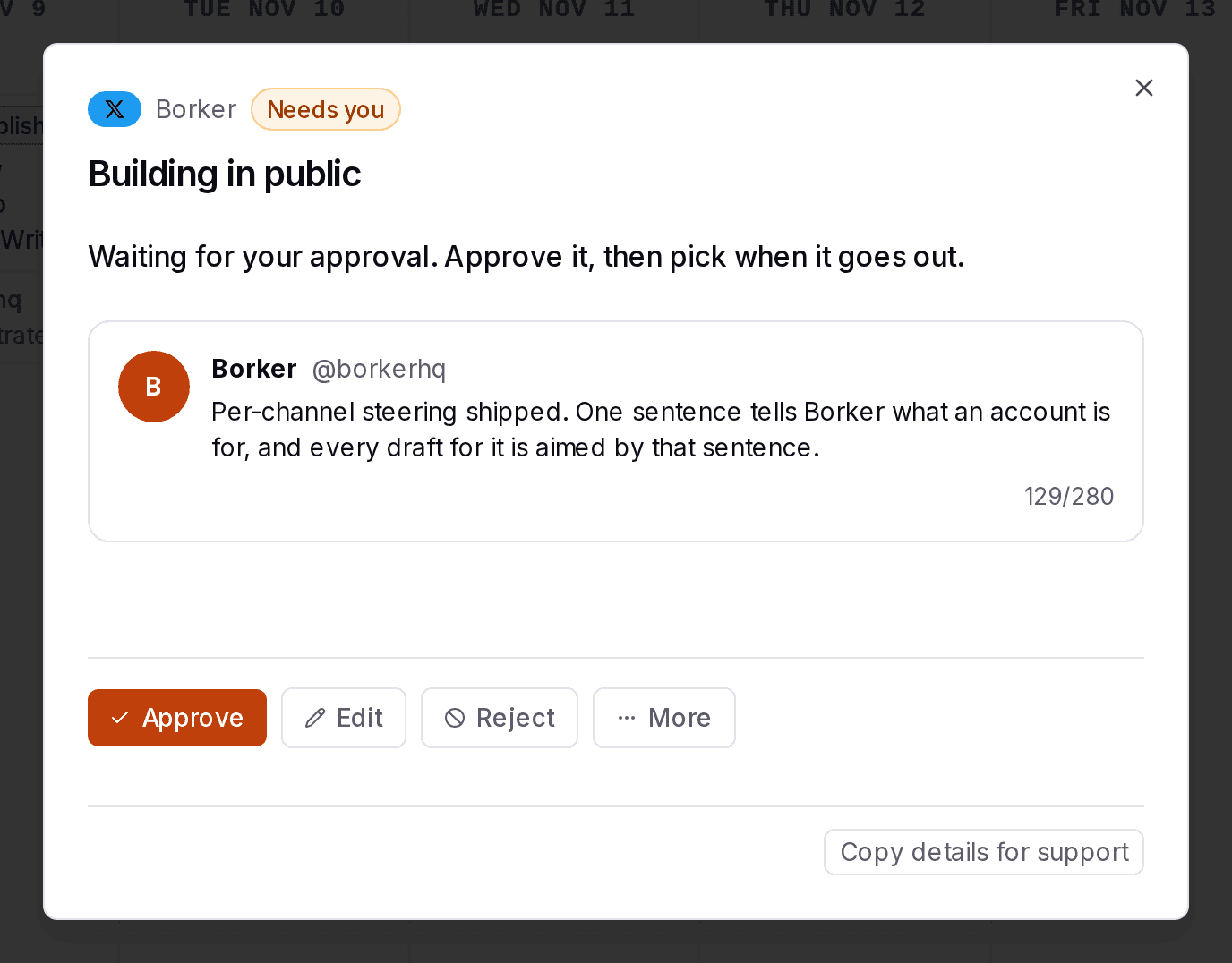
Select a written card to open it. You see the post the way it will look on its channel, where it came from, and when it goes out. What you can do depends on its state:
| State | Main actions | Under More |
|---|---|---|
| Needs you | Approve, Edit, Reject | Schedule, Publish now, Add image, Replan for…, Delete |
| In edit | Approve, Edit, Reject | Schedule, Publish now, Add image, Replan for…, Delete |
| Needs a time | Schedule, Edit, Reject | Publish now, Add image, Replan for…, Delete |
| Scheduled | Edit, Unschedule | Add image, Replan for…, Delete |
| Failed | Try again, Edit | Replan for…, Delete |
| Published | None | Replan for… |

Approve several at once
On the Board, tick cards or use Select all, then choose Approve Selected, Schedule Selected or Delete Selected. Posts marked AI-ism come up one at a time during a bulk approve: approve each one anyway, select Skip this one, or Stop reviewing.
Write a post yourself
+ New post, at the right of the top row, adds a post outside the plan.
Three ways to start a post
Three options under New post. Two give you a written post, the third a planned one.
Three weeks of wind tables said wait. This morning: 21 miles an hour, steady. We flew. Twelve seconds, then fifty-nine.
The paper says three miles over the ocean. It was 852 feet over sand, and it was enough.
The wind table
Written a few hours before it goes out
Three weeks of wind tables said wait. This morning: 21 miles an hour, steady. We flew. Twelve seconds, then fifty-nine.
The paper says three miles over the ocean. It was 852 feet over sand, and it was enough.
The wind table
Written a few hours before it goes out
Read it as steps
- Write it myself. You write the post and nothing is generated. It lands in Posts as Needs you, and its card says You asked.
- From a prompt. You say what you want and Borker writes the post. It lands in Posts as Needs you, and its card says You asked.
- From a source. You pick something Borker read, or paste a link, and say when it should go out. Borker plans it: it lands in Planning as Planned, and its card says Reacting to or From your own piece, with the title. Nothing is written yet. Borker writes it before it goes out.
| Option | What happens |
|---|---|
| Write it myself | Your own words, saved to Review. Nothing is generated and no generation is used. |
| From a prompt | Say what you want and Borker writes it for the channel you pick, into Review. Uses one generation. |
| From a source | Start from something you read or wrote. Pick a time and Borker plans it, then writes it before then. |
A post you write yourself or ask for from a prompt always waits for your approval, even on a voice that publishes on its own. A post from a source is written like any other planned post.