
Add-on packs: URL posts on X, extra generations, and team seats, priced in the open
When X made link posts expensive, most tools in this space either buried a per-post surcharge in the fine print or quietly skipped those posts. Borker prices it in the open. URL posts on X run on credits, credits come in packs you buy when you need them, and everything else stays flat. Extra generations, team seats, and an optional capped auto top-up round out the new add-ons page.
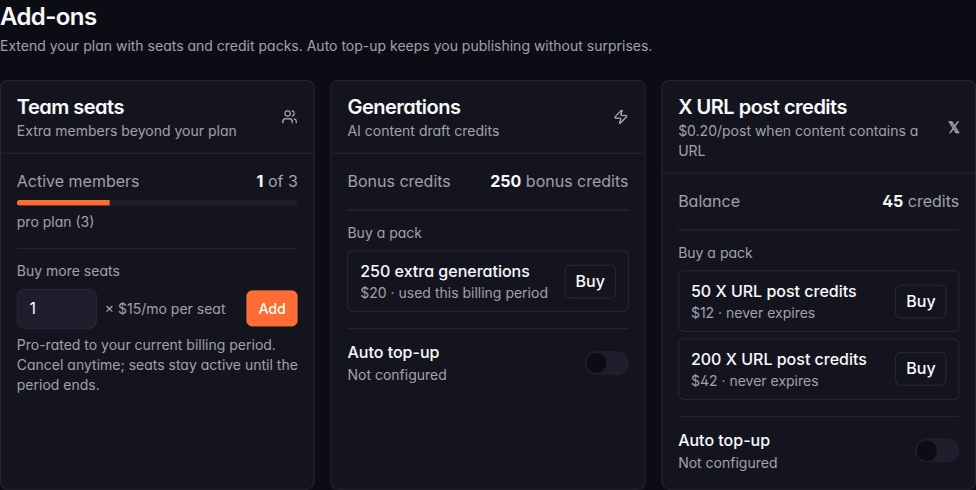
Borker now has add-on packs: a way to buy exactly the capacity you need (URL posts on X, extra generations, extra seats) without upgrading your whole plan. You'll find all of it under Settings → Billing → Add-ons.
X URL post credits
Some backstory, because this one deserves it. Posting a link to X through the API costs real money on X's side. When that changed, most tools in this space picked one of two answers: add a surcharge of about 20 cents per link post and tuck it into the fine print, or quietly skip publishing posts that contain a URL. The second one is worse than it sounds. Your post doesn't go out, and you find out when you wonder why last week's launch announcement never appeared.
We went with the boring, honest option: the price is on the label. URL posts on X run on credits, $0.20 per post, and the add-ons page says so in plain text. You buy credits in packs (50 or 200), they never expire, and your balance is visible at all times. A credit is only spent when a URL post publishes.
What stays free: every post without a link, and every post on every other platform. If you never post links to X, none of this touches you.
What else shipped
Generation packs
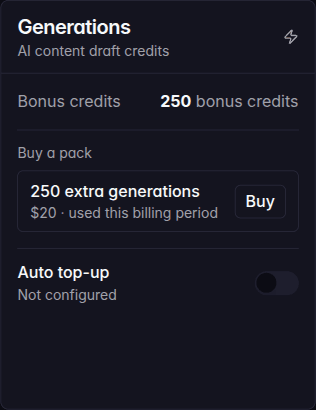
Your plan includes a monthly generation quota. Some months you need more: a launch, a campaign, a burst of news worth reacting to. Instead of upgrading your plan for one heavy month, buy a generation pack. The bonus credits stack on top of your plan quota and are only consumed after your included generations are used, so buying early never wastes them.
Auto top-up
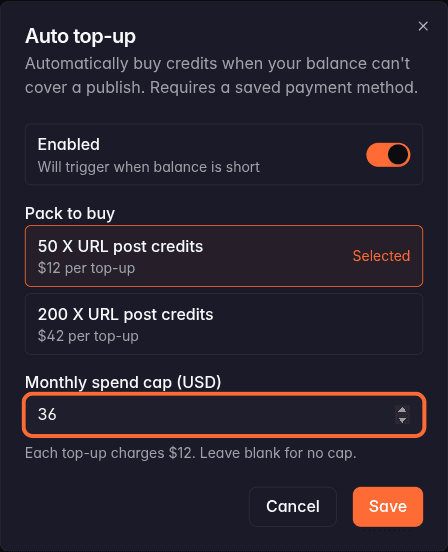
For the set-and-forget crowd. Turn on auto top-up and Borker buys a pack automatically when a publish would otherwise fail on an empty balance. You choose which pack it buys and set a monthly spend cap, so the worst case is a number you wrote down yourself. It's off by default and requires a saved payment method.
Your balance, one click away
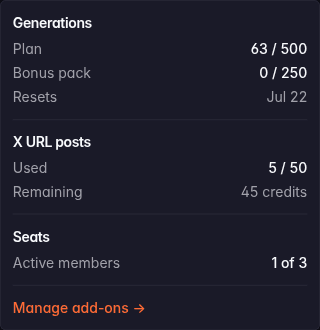
The sidebar shows your generation usage as a running counter. Click it and you get the full breakdown: plan quota, bonus pack credits, X URL credits used and remaining, active seats, and the date your usage resets. If a number ever surprises you, the "Manage add-ons" link takes you straight to the page where you can do something about it.
Extra team seats
Plans include a fixed number of members. If you need one more, buy a seat instead of moving up a tier. Seats are pro-rated to your current billing period and you can cancel anytime; a cancelled seat stays active until the period ends.
Bug fixes
- Automated daily posts could get stuck in the queue and never publish. Posts scheduled by the daily run now move onto your publishing schedule properly and go out at their slot time.
- The sidebar credit counter's popover could stick open. It now closes like any well-behaved popover.
- Clicking "+" on a calendar slot now preselects the channel you clicked, and the time picker opens properly instead of being clipped by the row.
New here? Borker is the AI content engine for founders.
We learn your voice, watch your news feeds, and ship posts to X, LinkedIn, Farcaster and your blog while you build the actual product.