
Paragraph as a real channel, channel archive, and a unified Edit modal
Borker now treats Paragraph as a first-class channel alongside X and LinkedIn. Disconnecting a channel archives it cleanly instead of orphaning your scheduled posts. The Edit and Publish flows merged into one modal with an inline schedule picker. X gets per-channel character limits so Premium accounts can finally use their 25k cap.
This release is a sweep through three loose ends. Disconnecting a channel used to be quietly destructive (your scheduled posts would fail at publish time with no recovery path). Editing a draft and scheduling it required two separate modals and three clicks. Paragraph blogs were second-class citizens that lived in their own section, not part of your normal Channels list. All three are fixed in this release, plus a smaller batch of polish across the Pipeline, Feeds, and Campaigns tabs.
Paragraph as a real channel
Connect your Paragraph blog from Settings → Channels and it shows up in the same connected-accounts list as your X and LinkedIn accounts.
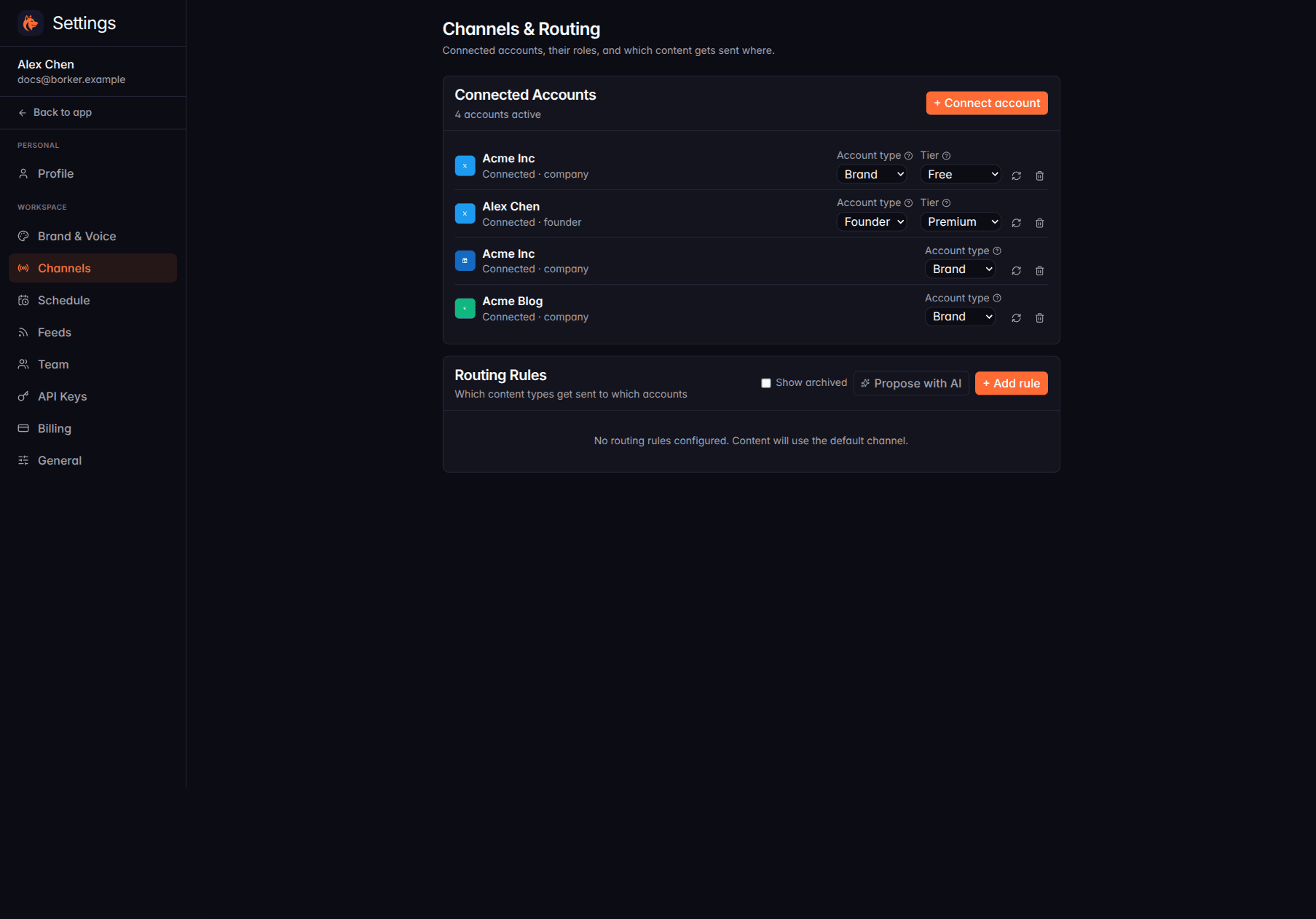
Long-form posts (1,000+ characters) route to your Paragraph channel the same way short posts route to your X account. The Pipeline gets a Paragraph column. Generation prompts know about the format (no markdown, essay structure, longer character counts).
This unblocks the workflow where Borker drafts a long-form blog post and you redistribute it across your social channels. Before this release, that flow only worked one direction (blog → social). Now the blog itself is a destination Borker can write to.
Unified Edit and Publish modal
The Pipeline used to open a different modal depending on what you clicked. Editing a draft was one modal, scheduling it was another, and approving + scheduling required two clicks across two surfaces.
Now editing and publishing happen in one modal:
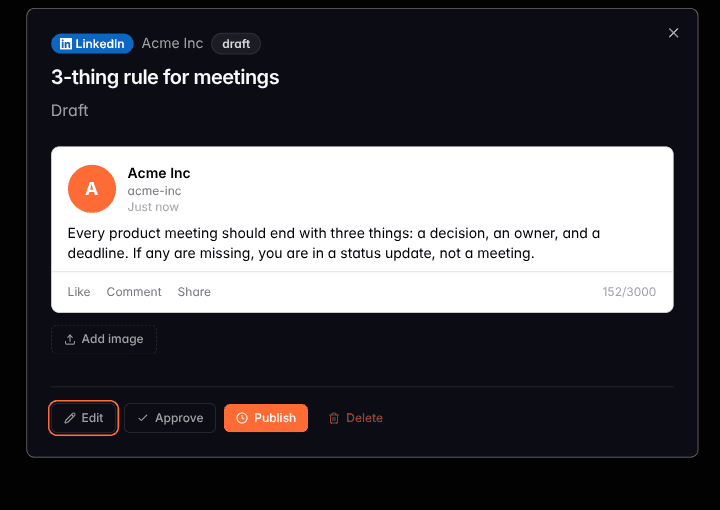
The bottom action row gives you all four moves in one place: Edit the post text inline, Approve the draft, Publish it straight to the channel (with a schedule picker for Manual / Publish now / Auto), or Delete it. Approving and scheduling are atomic: one click moves a draft from Review to Scheduled with the schedule already applied.
The same modal works across X, LinkedIn, Paragraph, and Farcaster, so you don't relearn an interface per channel.
X character limits per account tier
X has two tiers (Free and Premium) with very different character limits (280 versus 25,000). Borker used to assume 280 across the board, which meant Premium-tier customers could not generate or publish the longer posts they were paying for.
Each X channel now has a Tier dropdown (visible on the right of each X row in the Channels list). Set it to Premium and:
- Generation prompts know about the longer cap and produce posts that take advantage of it.
- The character counter in the Edit modal validates against the right limit.
- A pre-publish backstop checks the limit one more time before the post leaves Borker, so a misconfigured tier never ships an over-limit post.
Free-tier channels stay at 280 characters with the same validation.
Channel disconnect that does not strand your work
Before this release, disconnecting a channel was a hard delete. Any draft, approved, or scheduled post pointing at that channel was silently orphaned. Scheduled posts would fail at publish time with no recovery path.
Now disconnect archives the channel cleanly:
- The channel is hidden from the connected-accounts list. Routing rules pointing at archived channels are preserved (toggle Show archived under Routing Rules to bring them back into view).
- A dialog asks what to do with affected posts: reassign to another channel, or delete them.
- Reconnecting the same account later restores the archived channel with its history intact, so reporting and the calendar stay continuous.
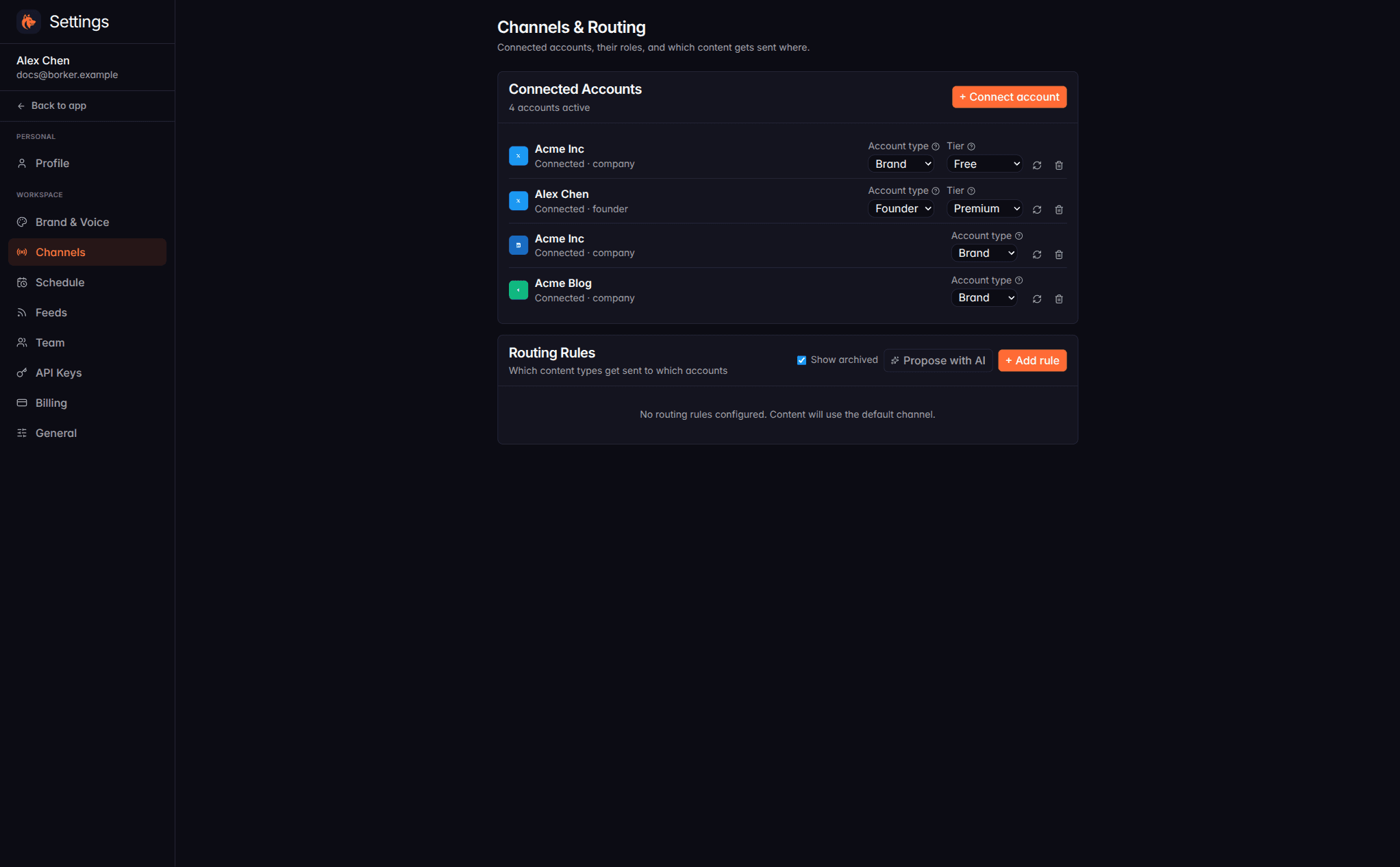
The same archived view applies to the Pipeline and Calendar so a disconnected channel does not silently disappear from your past posts. Old work stays browsable.
Bug fixes
- News tab is now Feeds. The old name described half of what the section did. The renamed section also gets clearer per-tab descriptions across Pipeline, Feeds, and Campaigns.
- Reject button on drafts now actually rejects. A bug in the reject API path was inverted, so clicking Reject would mark the draft as approved instead. Fixed.
- Back chevron in modals goes back. The chevron-back button in several modals navigated forward by one step instead of backward.
- Long redistribute feeds no longer lose entries. The processed-URL lookup hit an internal limit on feeds with hundreds of historical entries, so newly redistributed posts after a backfill could silently fail to register as processed. Fixed by switching to a paginated lookup.
- Schedule "Suggest with AI" buttons read the right response. The AI proposal endpoints for posting frequency and calendar slots were reading mismatched fields from their responses, so suggestions would arrive empty or with stale defaults.
New here? Borker is the AI content engine for founders.
We learn your voice, watch your news feeds, and ship posts to X, LinkedIn, Farcaster and your blog while you build the actual product.